
An AI workspace tool for documents is a platform where teams create, edit, and collaborate on content — with AI embedded in the workflow, not bolted on as an afterthought. Most teams already have a doc tool. The problem is that it's disconnected from where decisions happen, where tasks get assigned, and where context actually lives. This guide covers what separates a genuinely useful AI document workspace from a smart text editor, and how to pick the right one for your team.
What Makes a Workspace Tool Truly "AI-Native" for Documents?
AI-native means the AI understands your company's context — not just the document you're currently editing.
Most tools on the market today add AI as a writing assistant layer. You get grammar fixes, summaries, and auto-complete. Useful, but limited. The AI doesn't know what your team decided in last week's standup. It can't pull from your project history or your internal knowledge base. It's smart in isolation.
A genuinely AI-native workspace is different. The AI has access to your chats, your tasks, your databases, and your documents — all in one system. When it drafts a summary or generates a report, it's working from a real company context, not just the text in front of it.
Here's the practical difference:
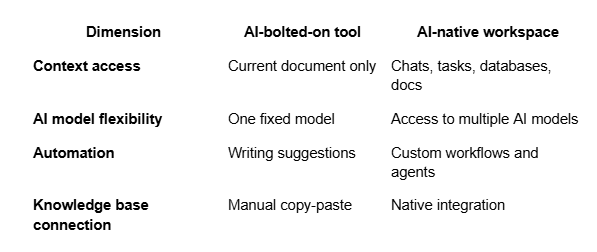
The gap between these two approaches widens the more complex your team's work gets.
What Document Features Should You Prioritize in 2026?
Real-time collaborative editing is the baseline — every serious tool has it. What separates good from great is everything around it.
Here's what actually matters for teams doing knowledge-heavy work:
Unlimited nested pages — so your knowledge base can scale without hitting structural limits. Inline comments and mentions — feedback that stays attached to the content, not buried in a separate thread. Version history and auto-save — so no one loses work and changes are traceable. Tasks linked directly to documents — action items shouldn't require you to open a different app. Two-tier permissions — internal teams get full access; external collaborators (clients, partners) get controlled visibility into what they need.
That last one is underrated. Most document collaboration tools treat all users the same. Teams that work with external stakeholders — clients, contractors, vendors — need a way to share specific content without exposing internal documentation.
These five features are the filter. If a tool is missing two or more, it'll create friction at scale.
How Does Tool Fragmentation Kill Document Workflows?
Here's a scenario most teams recognize immediately.
A product manager writes a spec in Notion. They share the link in a Slack thread. A developer asks a question — that discussion happens in Slack, not in the document. The PM takes notes from the answer and manually updates the doc. A task gets created in Asana based on something mentioned in the thread. Three days later, a new team member is onboarding and has no idea which version of the doc is current, what was decided in the thread, or where the task lives.
That's not a workflow. That's a scavenger hunt.
The problem isn't any individual tool. It's that each one is a silo. Documents, conversations, tasks, and structured data all live in separate places with no native connection between them. AI can't help much when it can only see one piece of the puzzle.
Teams that feel this pain are increasingly looking at platforms that unify communication, documentation, and project tracking in one place. BridgeApp, for example, lets teams build their document workspace alongside channels, tasks, and custom databases — so when an AI agent generates a report or creates a task from a conversation, all of that context stays connected. Instead of context switching between tools, the team works in a single environment where documents and decisions live together.
88% of organizations are already using AI in at least one business function. The ones getting the most value aren't adding AI to a fragmented stack — they're consolidating around systems where AI can access the full picture.
How Do the Leading AI Document Workspace Tools Compare?
The market splits into two camps: specialized document tools with AI features added, and unified workspaces where documents are one component of a broader system.
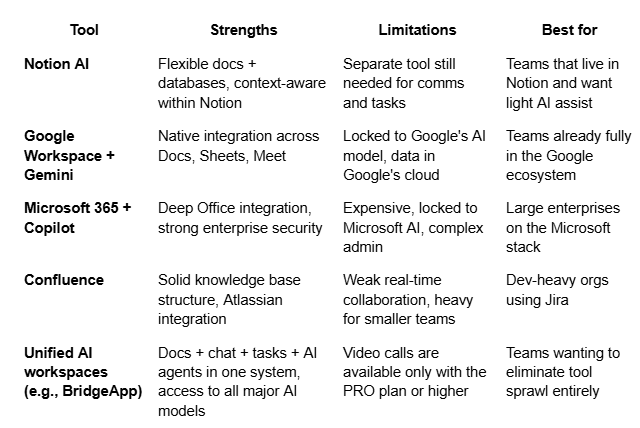
The key tradeoff is flexibility vs lock-in. Established ecosystems (Google, Microsoft) offer convenience if you're already invested. But they lock you into one AI model and one deployment model.
Teams that need to choose their own AI models, deploy on-premise, or work across departments without tool switching are increasingly choosing unified platforms over best-of-breed stacks.
What Role Do AI Agents Play in Document-Heavy Teams?
AI agents — software that executes tasks autonomously based on rules and context — are changing how document-heavy teams operate.
The classic use case: a team runs a weekly project sync. The meeting happens in a chat channel. An AI agent summarizes the discussion, extracts action items, creates tasks in the project tracker, and drafts a status update in the team's shared document. What used to take 20-30 minutes of manual work after every meeting happens automatically.
That's not hypothetical. Teams using agent-enabled workspaces report saving up to 4.6 hours per employee per week through this kind of automation — meeting summaries, document population, database updates, and client response drafts all handled without manual intervention.
The critical requirement: the agent has to understand your company's context. An agent that only sees one document can generate a summary. An agent that has access to your knowledge base, your chat history, and your project data can generate something actually useful.
This is why the architecture of your workspace matters more than any individual feature.
Does Your AI Workspace Need On-Premise or Cloud Deployment?
For most startups and SMBs, cloud deployment is the right call. Fast setup, no infrastructure overhead, pay-as-you-go pricing.
But for teams in regulated industries — legal, finance, healthcare, government — where data lives matters as much as what the tool can do. Putting sensitive client documents or internal IP into a vendor's cloud isn't always an option.
Use this framework to decide:
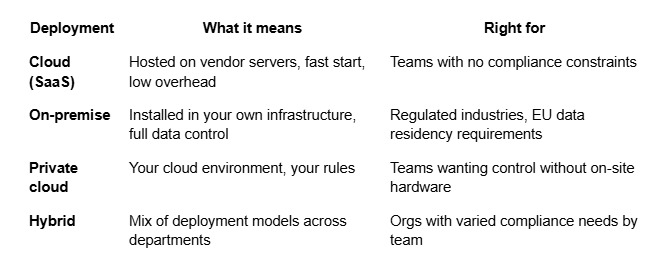
One thing often missing from AI workspace evaluations: most tools only offer cloud deployment. If data sovereignty matters to your organization, that's a hard constraint — and it eliminates most options before you even look at features. Platforms like BridgeApp support all four deployment models, including full on-premise — which is why they're gaining traction in finance, healthcare, and government teams that can't compromise on where their data lives.
How Do You Know When It's Time to Switch Tools?
Sometimes the pain is obvious. More often, teams normalize friction until it's baked into how they work.
Five signs you've outgrown your current document workspace:
You're still context switching — documents live in one place, conversations in another, tasks in a third.
AI doesn't know your company — it can help you write, but it doesn't know your products, processes, or team decisions.
External collaboration requires workarounds — sharing docs with clients means creating separate accounts or managing permissions manually.
New team members can't find anything — knowledge is scattered across tools with no single source of truth.
Automation means more integrations — every new workflow requires a new Zapier connection or API call between tools.
If three or more of these match your situation, the issue isn't the feature set of your current tool — it's the architecture. Adding AI to a fragmented stack gives you a smarter fragment.
The best AI workspace tool for documents isn't the one with the most writing features. It's the one where documents are connected to your conversations, your tasks, and an AI that actually understands how your team works. That's the shift worth making — and it starts with choosing a platform that was built as a system, not assembled from parts.